Article details
Recap from Sachin's Reforge Event: The Compounding OS
Almost every product team will tell you they're using AI. What they won't tell you — because they probably haven't measured it — is how much of that usage is actually compounding across the team versus evaporating the moment someone closes their browser tab.
Sachin Rekhi — three-time founder, former LinkedIn Head of Product who incubated Sales Navigator, and Reforge course creator — has been studying this gap closely. What he's found is counterintuitive: as AI adoption has gone up across the industry, the gap between the best teams and average teams has widened, not narrowed. Elite teams are seeing 2–3x productivity gains as measured by merged PRs. Average teams are seeing 20–30%. The difference isn't the tools. It's the system.
The system that separates them is what Sachin calls a Compounding OS.
Why individual AI usage doesn't compound
To understand what a Compounding OS solves, start with what most teams are actually doing.
Imagine you want to run an NPS analysis. You open Claude or ChatGPT, upload your CSV of scores, and spend a few hours prompting your way through it — calculating the average, graphing trends over time, segmenting by cohort, analyzing verbatim feedback from promoters and detractors. The output is real. The effort that used to take weeks now takes hours. An improvement.
But next quarter, when you want to run the same analysis, you start over. You go back to a blank session, maybe hunt for the prompts from last time, and spend another few hours on it. When a colleague wants to run NPS analysis, they don't have access to what you figured out. They start from scratch, too.
This is individual AI productivity. It's better than nothing, but it's fundamentally siloed. Every insight, every prompt refinement, every hour of work you invested disappears when the session closes.
A Compounding OS looks different. Instead of running an interactive NPS session, you build a "conduct NPS analysis" skill — a documented, reusable workflow that captures everything you'd do interactively. Next quarter, you rerun the skill. It takes ten minutes and returns a complete report automatically. At NoteJoy, Sachin now runs NPS analyses weekly, fully automated — something that used to happen quarterly at LinkedIn.
When a colleague wants NPS analysis, they find the skill and run it. If they improve it — say, adding a new segmentation approach — the whole team benefits. The system gets smarter with every use rather than resetting to zero.
Step one: standardize on an agentic platform
Most teams use AI through chatbots — Claude, ChatGPT, Gemini. A chatbot is optimized for questions and answers. An agentic platform is optimized for something different: artifact generation and workflow automation.
The distinction matters. Agentic platforms like Claude Code, Claude Cowork, and Codex can create actual deliverables — code, documents, designs, dashboards, prototypes — rather than just responding to prompts. They can execute multi-step workflows end-to-end without manual intervention. And they support sophisticated context strategies that go well beyond what's available in a chat window.
The most common objection Sachin hears to picking one platform: how do I commit when things are changing so fast? His answer: cross-team compounding is worth far more than any individual tool's marginal productivity. Being on the same platform as your teammates — sharing skills, sharing artifacts, sharing context — compounds in a way that using the theoretically best tool in isolation never will.
Darragh Curran, CTO of Fin (a deeply AI-native company), described their early mistake exactly:
"When we started our effort, our approach was to be maximally permissive, supporting everybody to try any and all tooling. We weren't opinionated enough early on. There were gains, but mostly in isolation — individuals figuring out personal leverage, but rarely compounding across the entire team." Once they standardized on Claude Code, he said, "it became immediately obvious that every gain was automatically compounding across the whole organization."
But what about getting locked into one platform? Sachin says not to worry about it. MCP servers — the standard way agentic platforms connect to third-party tools — are consistent across platforms. Skills are becoming portable through emerging open standards. Markdown files work everywhere. Configuration files that are platform-specific can be ported to a new platform in minutes by simply asking the new tool to translate them. If you decide to switch, you can. The cost of switching is much lower than the cost of not committing.
Step two: build a shared skill library
A skill is a saved, reusable prompt that can be shared, improved, and automated. It's the core unit of a Compounding OS.
Skills do several things at once:
They eliminate repetition. No more hunting for prompts from six months ago.
They share institutional know-how. Whomever on the team figured out how to do something well encodes that knowledge for everyone.
They enable full workflow automation. Instead of using AI as a question-answering assistant, you're running end-to-end automated tasks.
They compound. When someone improves a skill, everyone who uses it gets the improvement.
Most importantly: they encode taste, the judgment your organization has built up about what good work looks like. Most of that judgment currently lives in people's heads. Skills can make it explicit, consistent, and transferable.
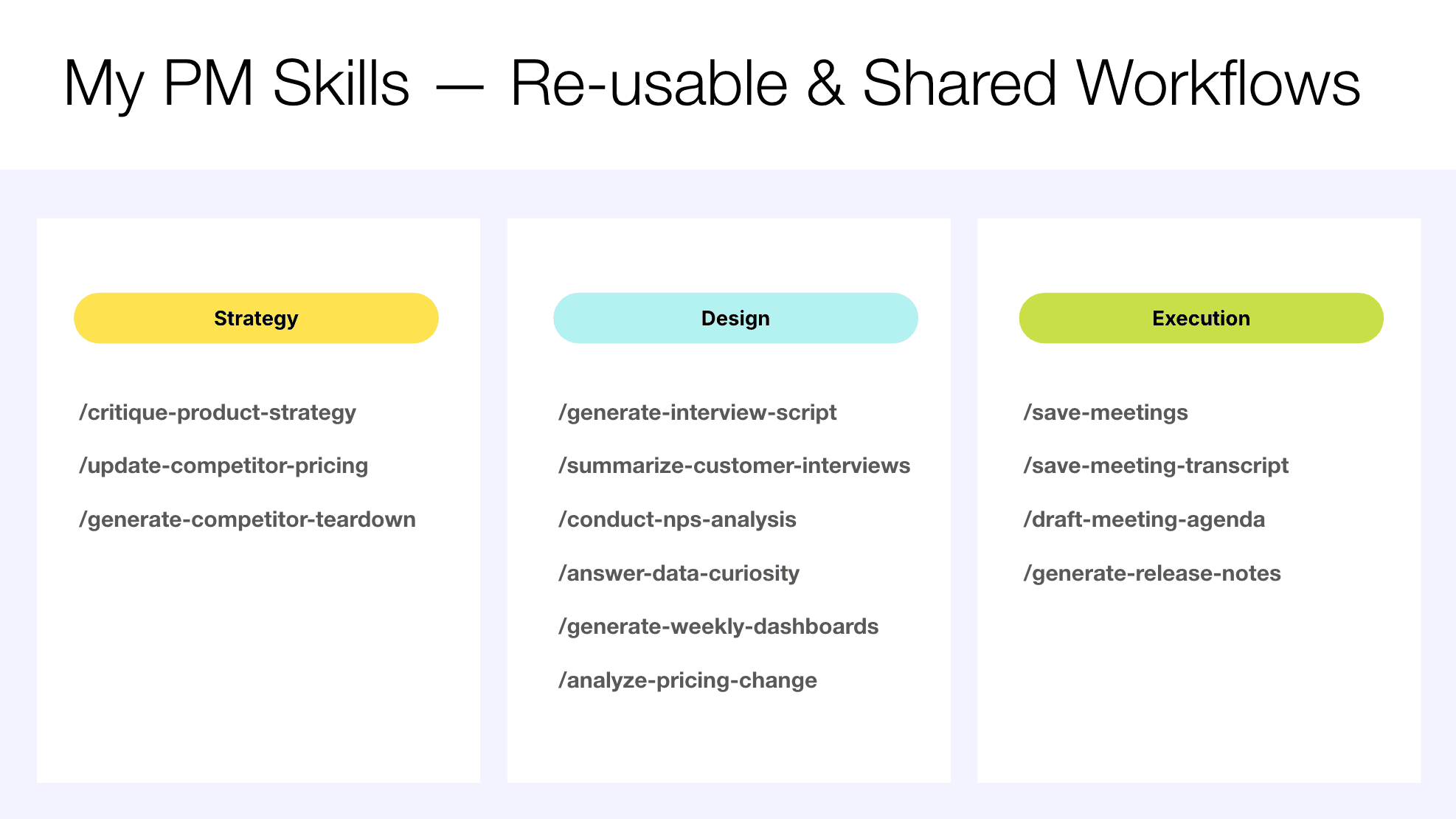
Sachin has built a library of skills organized around the core pillars of product management: strategy, design (including user research), and execution.
For strategy, he has a competitor pricing tracker that visits each competitor's pricing page weekly and surfaces any changes. He has a competitor teardown generator — you give it a company name and domain, and fifteen minutes later you have a structured report covering differentiation, traction, and positioning. He's also built a product strategy critique skill, fed with frameworks and best practices, that he finds far more reliable than asking AI to generate strategy from scratch.
For user research, he has skills to run NPS analysis, summarize customer interviews, generate interview scripts, and answer ad hoc data questions in natural language. For execution, he has skills to draft meeting agendas, generate release notes, and handle the category of low-value recurring work that consumes PM time without demanding PM judgment.
Building a skill has three parts.
The first is detailing the steps. You describe what you want the workflow to do in plain language — you don't need to write code or be especially technical. Sachin's "answer data curiosity" skill tells Claude to examine the available database, summarize its schema, ask the user what they want to know, write appropriate SQL, execute it, and return an HTML report with a visualization. He never specified bar chart vs. line chart — the AI makes that call based on the data and question. High-level instructions are often enough; you can add specificity over time.
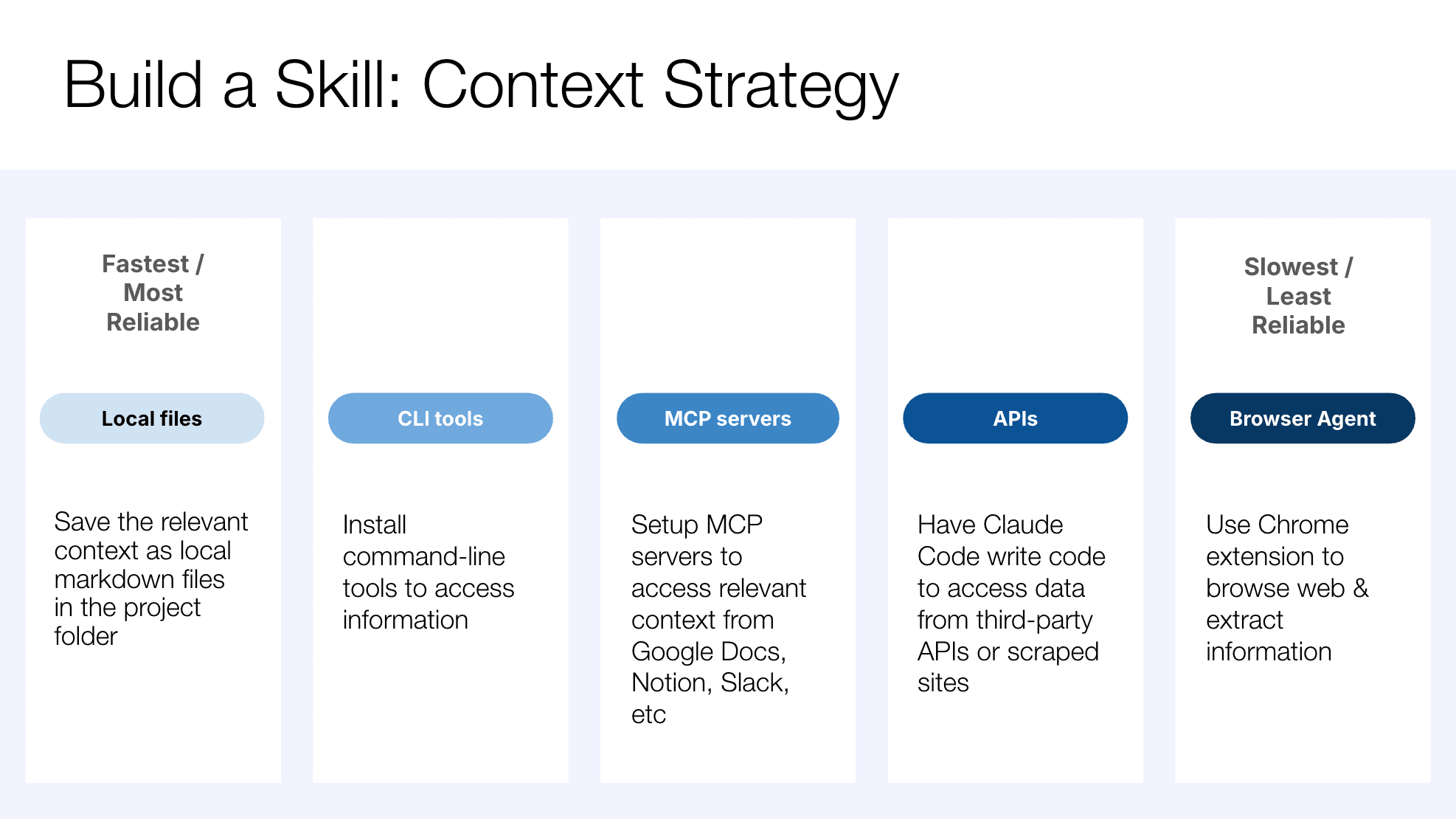
The second part is the context strategy — deciding how to get the right information to the skill. There are five options, ranked roughly from most to least reliable. Local files are fastest and most reliable; for NPS analysis, you hand the AI the CSV directly. Command-line tools extend what the platform can do — Sachin's interview summary skill uses the Wispr command-line tool to transcribe video before summarizing. MCP servers connect the AI to third-party systems like Notion, Slack, Google Docs, or a database. API calls work when the data you need is behind an API — you tell the AI what you need and it writes the code to access it. Browser agents are slowest and least reliable but are sometimes the only option, as with live competitor pricing pages that can't be accessed any other way.
The third part is shaping the output. Three strategies work: templates (give the AI a detailed structure to fill in, as Sachin does for interview summaries), best practices (give it a framework or reference — his interview script skill is prompted to apply the principles from The Mom Test by Rob Fitzpatrick), or inspiration (give it examples of great work in your voice — his release notes skill is loaded with 25 release notes he wrote manually, so generated notes match his style).
Sharing skills at scale requires hygiene. As teams grow, skill proliferation becomes a real problem — six slightly different versions of the same workflow, created independently by people who didn't know others had already built it. Three rules prevent this: skills should have discrete owners who are responsible for keeping them working; one skill per workflow rather than forked variations; and functional experts should become skill managers (the research team owns research skills, the data team owns data skills, etc.). When the people who know the domain best own the automated workflows, both the skills and the underlying expertise improve together.
For discovery across a larger organization, the best teams build an internal skills browser — a simple internal website listing all available skills, their descriptions, how they're used, and how popular they are. The native skill-browsing experience inside agentic platforms isn't great, so a dedicated directory makes skills findable.
Step three: make company context machine-legible
The shift that's happened quietly over the past year is that prompt engineering — crafting longer, more specific prompts — is being replaced by context engineering. The insight is that a simple prompt plus rich, relevant context produces better output than an elaborate prompt with no context.
Instead of asking Claude to "critique the attached product strategy document, specifically reviewing target audience segments, pain points and value proposition, success criteria, and competitive positioning" — one long prompt — you can simply say "critique the attached product strategy" and let the context do the heavy lifting. That context might include strategic best practices synthesized from product review transcripts at your organization, frameworks from strategy thinkers you trust, and examples of past critiques written manually by your team. The response is more accurate and the prompt is simpler.
But to make context engineering work, your context has to be accessible to AI. Most organizations' institutional knowledge is currently locked in formats — or behind access controls — that AI can't reach. Making it machine-legible is the infrastructure work that unlocks everything else.
There are three domains worth addressing: company knowledge, design, and data.
Company knowledge covers everything AI needs to understand your business: your objectives, your customers, your research, your history of decisions. MCP servers now exist to connect AI to virtually any system that holds this information — Notion, Confluence, Google Docs, Microsoft Office, Slack, email, calendar, CRM, project management tools, and the list goes on and on. Sachin's recommendation: configure a standard set of connectors at the organization level so that when someone on the team starts a new project, they already have twelve data sources hooked up. That's the compounding benefit applied to context — the infrastructure gets built once and everyone benefits.
Design covers your design system — the colors, typography, components, icons, and layouts that define how your product looks and behaves. Without a machine-legible design system, every AI-generated prototype requires manual rework to bring it in line with your brand. With one, prototypes are on-brand by default.
Most teams start with a Figma design library. Connecting it to AI via the Figma MCP server is a quick first step that produces UI-consistent prototypes immediately. But the more powerful move — and where the best teams are heading — is migrating the design system from Figma into code, with actual front-end components documented in a tool like Storybook. This unlocks a second benefit beyond consistent prototypes: accelerated engineering handoff. When a PM builds a prototype using the same code components engineering uses in production, the gap between prototype and shipped feature shrinks dramatically.
Data means making your database or data warehouse queryable in natural language. The goal: anyone on the team can ask "what percentage of users have profile images?" and get a SQL query written, executed, and returned as a formatted report with a visualization, without writing a line of code.
Setting this up requires three steps. First, connect your data source via an MCP server — these now exist for MySQL, MongoDB, Snowflake, BigQuery, and most other systems. Second, provide a library of example query pairs: natural language questions alongside vetted SQL that answers them. Giving the AI 100 such pairs significantly improves accuracy. Third — and most powerfully — add a semantic layer: brief documentation of what each table and column actually means in your business context. Database column names are often cryptic; a sentence describing what each one represents makes a huge difference.
Where to start
The Compounding OS has a lot of moving parts, but you don't have to build all of it at once. Sachin laid out a straightforward progression.
If you're still working primarily through chatbots, install Claude Code or Codex and spend time understanding what an agentic platform makes possible. If you're using agentic tools but haven't saved anything as a skill, build your first one tonight. If you have skills but they only live on your machine, figure out how to publish them to your team. If skills are already shared, pick one and improve it — or assign ownership to prevent the proliferation problem. If your team is running smoothly on skills, turn to context: set up your most important MCP connectors, document your design system, or add a semantic layer to your data.
The companies that are pulling ahead aren't using fundamentally different tools. They're building systems that compound. Every skill built, every connector configured, every piece of context made machine-legible raises the floor for the whole team. Individuals figure things out in isolation, and the knowledge disappears. Teams build a shared OS, and the knowledge compounds.
Watch the full recording here
Find out more about Sachin's Reforge courses: AI Transformation (new this fall!), AI Productivity, Mastering Product Management, and Product Innovation Strategy